
Run a first show
In this tutorial you run the studio app against the real desk on your own machine, with a room already full of people: Eilidh presenting The Morning Kettle, two guests, a remote DJ, the screener Moira and four callers. You put people on air, take a caller from the screener, and watch the desk tell you the truth when playout stops.
It takes about twenty minutes once the images are built.
What this stack is. It is a test stack, built from the repository, not a station. The people are synthetic: each sends a quiet noise at its own level, so their meters move but there is nothing to listen to. The studio app runs as a web page in your browser; it shows the desk and sends your keys, and carries no audio itself. A show with real voices joins through the invite page or the player’s call-in (The public pages); this stack does not serve them. To run a real station, install the published server image with
weavesignal.shand the published studio app (on Linux, on Windows) instead.
Before you start
Section titled “Before you start”You need a Linux machine with Podman, just, Rust 1.98 or later, pnpm 10, curl and Python 3, and the repository checked out.
The stack uses TCP ports 27310, 27420, 27432, 27812, 27815 and 27880, and UDP ports 27882 and 27913, all clear of a station’s defaults; the script stops if one is taken.
Build the desk’s images and the desk, once, from the repository’s root:
podman build -t localhost/weavesignal-desk-spike:dev spike/desk-imagejust desk-imagejust desk-buildcd apps/studio && pnpm install && cd ../..1. Start the studio
Section titled “1. Start the studio”tests/m2/run-studio.shIt starts LiveKit, PostgreSQL, Liquidsoap (playout and the listener process), the desk, the control plane, nine synthetic people and the interface, then prints:
up: the studio app at http://127.0.0.1:27420/ (LiveKit :27880, control :27310, SRT :27913)The first start builds the control plane, which takes a few minutes; the demo carts then load in about a minute. Leave it running, and open that address in your browser.
2. Read the desk
Section titled “2. Read the desk”You are on the Desk tab. At the top of the stage the lamp says ON AIR: playout is connected and people are on air.
On the stage are three tiles, in slot order: Eilidh in slot 1, Gregor Stewart in slot 2, Kirsty Wilson in slot 3. Presenters and guests are on air from the moment they join. Under the stage, in Not on air, is Finlay Grant, the remote DJ, in slot 5: DJs join off air.
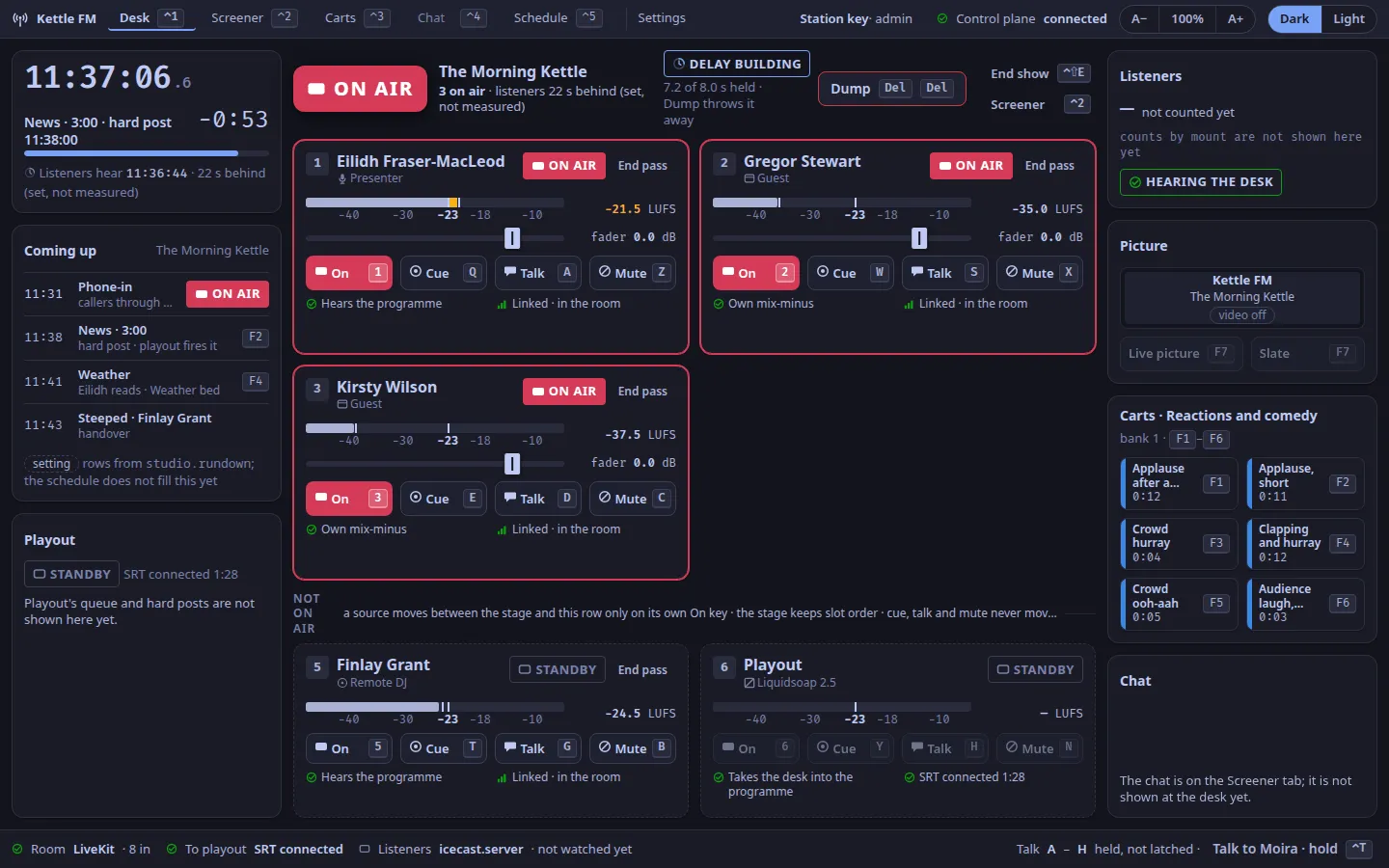
Hover over the header of any panel: its name appears, such as desk.stage or desk.tile.2.
Those names are the headings of the Desk reference.
3. Put Finlay on air, and off
Section titled “3. Put Finlay on air, and off”Press 5.
Finlay’s tile moves onto the stage and says ON AIR.
Press 5 again: he goes back to Not on air.
Now press T, slot 5’s cue key.
Finlay says CUE: he would be in your headphones, not on air.
Press T again to stop.
4. Mute a guest, and talk to another
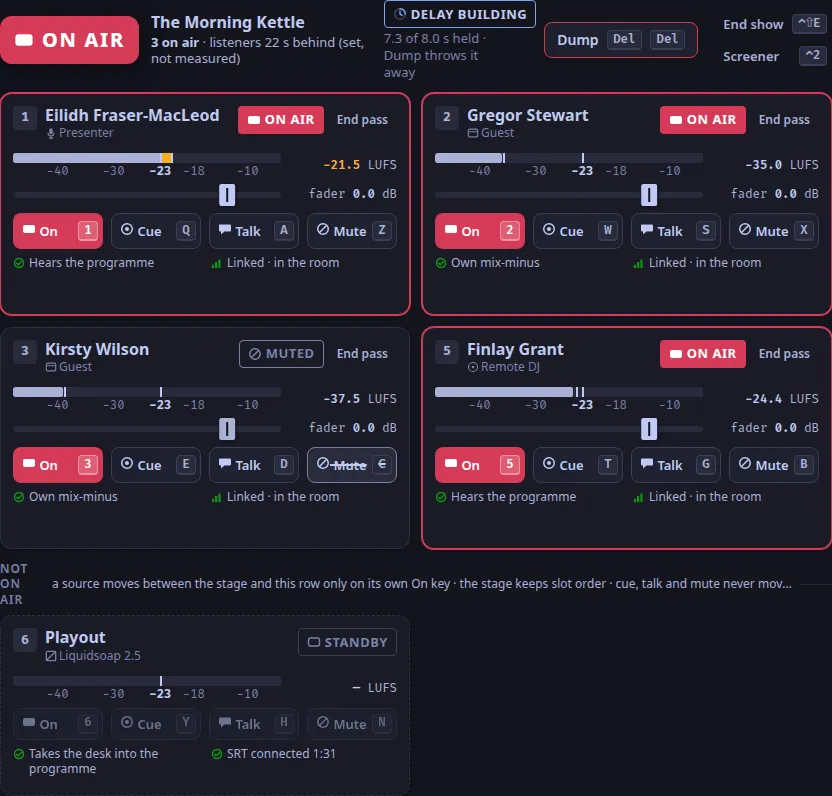
Section titled “4. Mute a guest, and talk to another”Press C, slot 3’s mute key.
Kirsty stays on the stage and says MUTED.
Press C again.
Hold S, slot 2’s talk key.
While you hold it, only Gregor would hear you, and you are off the programme.
Let go.
5. Screen a caller
Section titled “5. Screen a caller”Press ⌃2 for the Screener tab.
Four callers wait in screener.queue: Niall, Dougal, Jessie and Tavish.
Tavish carries BANNED BEFORE, with the date and the reason, from the control plane’s settings file.
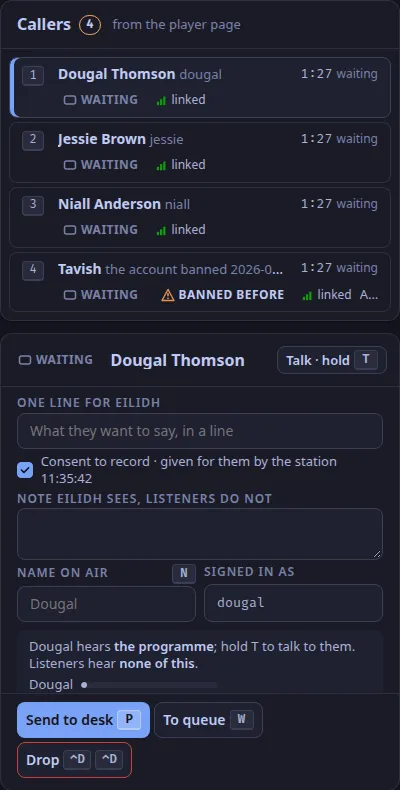
- Press the number beside Niall to select him.
- Hold
T: he becomes SCREENING, and you are talking to him off air. Let go. - Click One line for Eilidh and type
Bus lanes on Leith Walk. PressEscto leave the field. - Press
Pto send him to the desk.
6. Take the caller to air
Section titled “6. Take the caller to air”Press ⌃1 for the Desk.
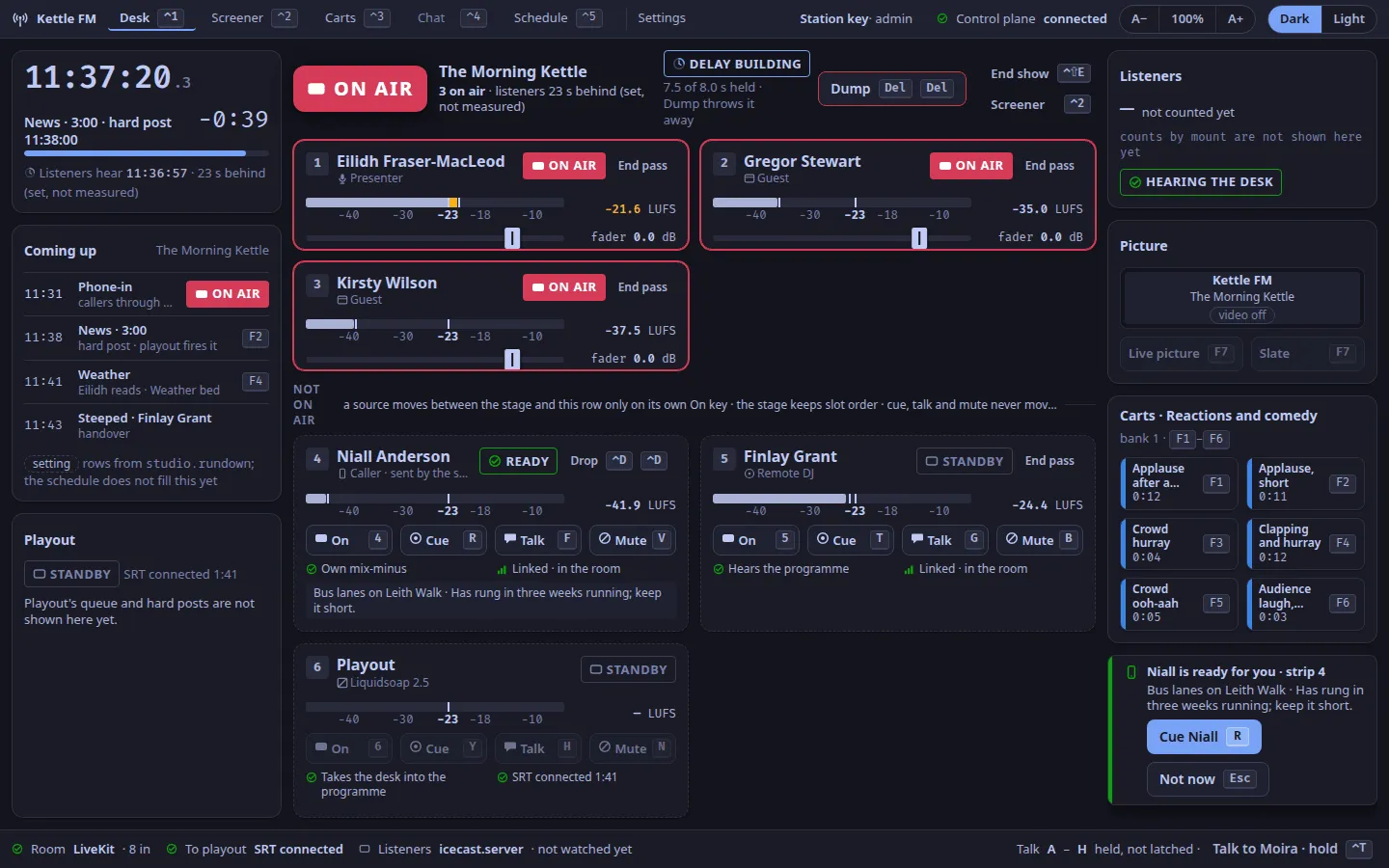
The toast says Niall is ready for you · strip 4, with your line.
- Press
Rto accept him: he is cued. - Press
4: Niall is on air. - Press
4again to take him off, then⌃Dtwice to drop him.
Send Dougal from the screener the same way, and this time press Esc on the desk.
Back on the screener, Dougal says DESK BUSY, and the status line says the desk is not taking callers.

7. Stop playout
Section titled “7. Stop playout”In a second terminal, from the repository’s root:
tests/m2/run-studio.sh downWithin a moment the lamp says PLAYOUT DOWN, and every tile on the stage says OPEN: the room still hears them, listeners do not. The toast says Playout down · room alive.
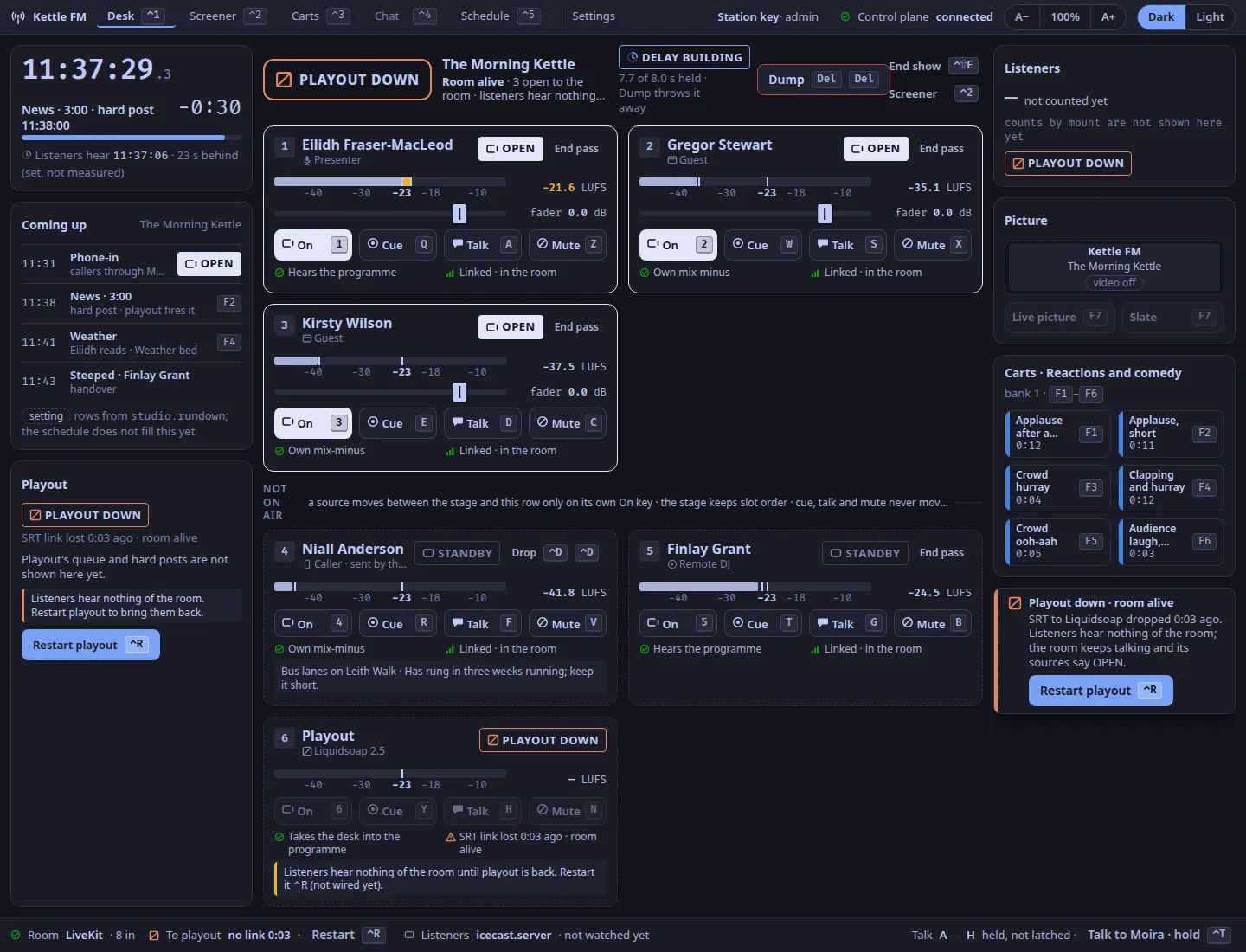
tests/m2/run-studio.sh upThe lamp says ON AIR again by itself; in the driven test of this stack it took 714 ms.
8. Finish
Section titled “8. Finish”Press Ctrl+C in the first terminal.
The script stops everything and keeps each part’s log in tests/m2/run/.
What you learned
Section titled “What you learned”- The lamp says ON AIR only when listeners can hear (What ON AIR promises).
- Each person keeps their slot and their keys; the four rows of keys are on air, cue, talk and mute (Keymap).
- A caller goes from the screener’s queue to READY on the desk, and the presenter accepts with Cue or declines with
Esc.
Next: Get ready to present, or Who hears whom.
The same stack is driven from the keyboard alone by tests/m2/drive.mjs, which covers these steps; it passed 20 of 20 checks on 2026-10-25.
The steps on this page were checked against the code for 1.0.0, not walked by hand again.
Text and images CC BY-SA 4.0; code samples AGPL-3.0-only, as the code is. Licences.