
Moderate the chat
This is for the screener, on the studio app’s second tab (⌃2), beside the callers.
Listeners chat on the player page; reading needs no account, posting needs a light account (ADR-0034).
Nothing here makes a station compliant with any law: the station decides how it uses these tools.
What the chat does first
Section titled “What the chat does first”Before anyone sees a message, the chat applies the station’s rules (ADR-0036):
- a word filter (rustrict only, ADR-0037): a flagged message waits for you, however long;
- a rate limit, and accounts must be 10 minutes old to post;
- links only from trusted chatters;
- with Hold new accounts (
K) on, messages from accounts under a day old wait 5 s for you, then go to the room by themselves; a guest’s always do.
Needs you
Section titled “Needs you”screener.needs lists reports, held messages, notices from people without an account, and requests for a review.
An intimate-image report comes first, with its 48-hour clock.
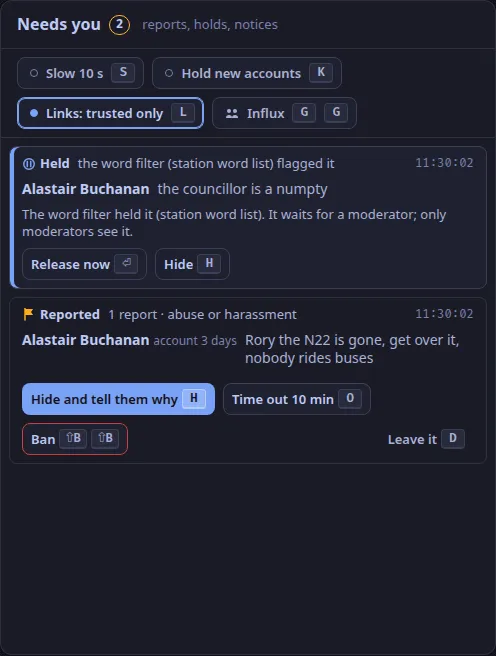
| Key | Does |
|---|---|
H |
Hide, and open the statement of reasons |
O |
Time out for 10 minutes |
⇧B ⇧B |
Ban: the account cannot post, and its past messages leave the room |
D |
Leave a reported message as it is |
⏎ |
Release a held message now |
⇧U, ⇧X |
Release all held, hide all held |
A |
Acknowledge a notice |
⇧E |
Preserve the evidence and escalate: a hold stops it being deleted |
Tell them why
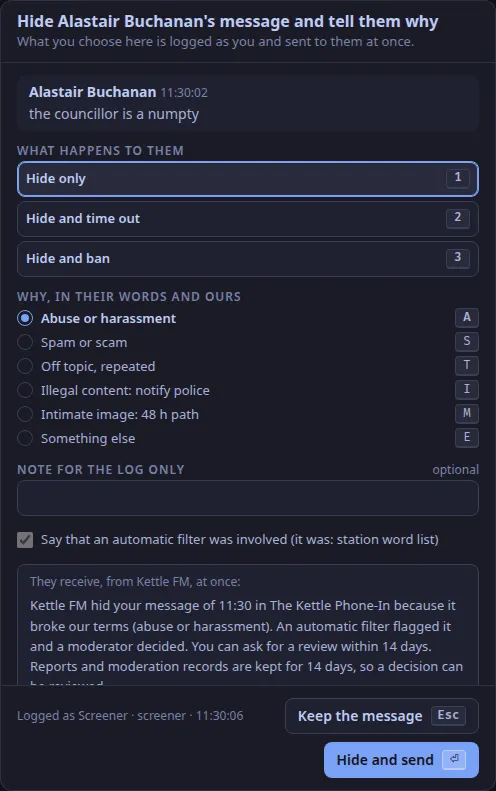
Section titled “Tell them why”H opens screener.statement.
Choose what happens (1 hide, 2 hide and time out, 3 hide and ban) and why (A S T I M E), add a note for the log if you like, and press ⏎.
The chatter receives a statement of reasons at once: what was done, why, whether the word filter was involved, and that they may ask for a review within 14 days.
Every act is logged with your name, the reason and the time.
The private lane
Section titled “The private lane”screener.studio holds messages listeners sent to the studio; only you and the presenter see them (ADR-0040).
R replies privately, ⇧M passes the message to the presenter, I invites the chatter to call in from the player page.
The room
Section titled “The room”screener.room is the chat in real time; listeners are about 23 s behind: the studio.listener_delay_ms setting (15 s by default) plus what the profanity delay holds (8 s by default) (ADR-0103, ADR-0165).
The 15 s is a setting, not a measurement (What release one does).
Select a line for its actions: F features it on the player page, ⇧P pins it, I invites, H hides, O times out.
Post as the station with ⌃⏎.
A busy night
Section titled “A busy night”Press G twice within 3 s: influx mode turns on accounts only, a 24-hour account age, slow mode (one message every 10 s), the hold for new chatters and trusted-only links (ADR-0068).
Press G twice again to put every setting back as it was.
S, K and L switch slow mode, the hold and trusted-only links one at a time.
Text and images CC BY-SA 4.0; code samples AGPL-3.0-only, as the code is. Licences.