
Screener
The screener is the studio app’s second tab (⌃2): callers on the left, what needs the screener in the middle, the room’s chat on the right.
The caller lane works the real desk through the control plane (Screen callers), and the chat lanes work the chat service (Moderate the chat).
Each heading below is a panel’s name, as it is on screen (ADR-0070). Hover over a panel’s header, or focus it with the keyboard, to see its name.
screener.status
Section titled “screener.status”The verdict first, then the show: the lamp’s word, the show and its presenter, whether the desk is taking callers, the studio clock and the time listeners hear, the screener’s own name, and Talk to the presenter, held (⌃T).
The desk is “not taking callers” while any caller sent to it carries DESK BUSY.
Listeners shows a dash: the listener count is not in WeaveSignal 1.0.
screener.queue
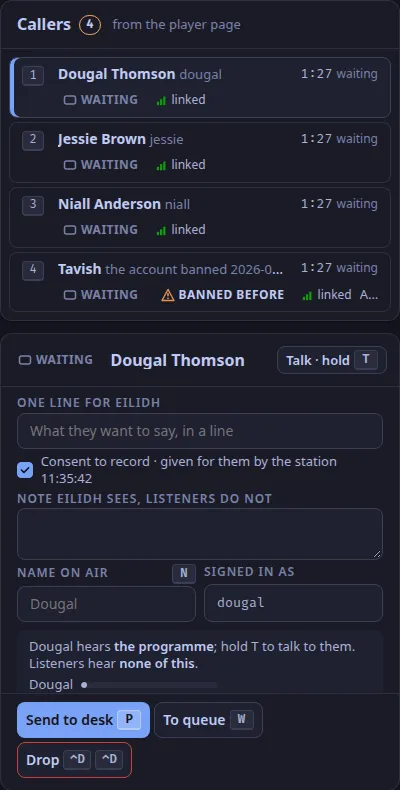
Section titled “screener.queue”Callers in the order they arrived, with an ordinal key (1 to 9), their name, their state, their link, how long they have waited, and their line; a caller at the desk shows its strip (strip 4), and one without consent to record a no consent tag.
A caller whose link dropped stays in their place, marked with when it dropped, for 5 minutes.
A caller is anyone with the caller role, each in a booth room of their own (Roles), which includes a listener who calls in from the player page (ADR-0006).
The queue shows the name they gave and the line they typed about the call; the form has no field for a town.
screener.screening
Section titled “screener.screening”The selected caller:
- whether they hear you, and what listeners hear (“none of this”), with their level;
- One line for the presenter, and a Note the presenter sees and listeners do not;
- Name on air (
N); - BANNED BEFORE, with the date and reason, when it applies (from the station’s
studio.bannedsetting); - Send to desk (
P), or Send again after a decline; To queue (W); Drop (⌃D ⌃D); - DESK BUSY, when the presenter declined them, with the time and the reason (Desk busy: ⟨presenter⟩ is not taking callers);
- the consent to record, accepted on the player page or given for them by the station; a caller without it cannot be sent to the desk, and Send to desk is disabled until it is on file.
screener.needs
Section titled “screener.needs”Needs you: the chat’s modes, slow (S), hold new accounts (K), links for trusted chatters only (L), and influx (G G).
Under them, everything that needs a person, oldest first: reports, held messages with their countdown, notices from people without an account, and requests for a review, each with its keyed actions (Keymap).
screener.studio
Section titled “screener.studio”To the studio: private messages only the screener and the presenter see (D40). The screener can reply to the sender, invite them to call, or pass the message to the presenter.
screener.statement
Section titled “screener.statement”The statement of reasons: the action, the reason, the log note, and the words the user receives (D31). It opens when the screener hides a message or hides all the held ones.
screener.room
Section titled “screener.room”The room: the chat in real time with the audience’s lag stated, the selected message’s actions, and the staff composer.
screener.toast
Section titled “screener.toast”The reserved toast slot under the room’s head, in flow, so a toast moves the feed down and covers nothing. Built: the screener’s notices, such as a caller declined by the desk or taken by the presenter.
Text and images CC BY-SA 4.0; code samples AGPL-3.0-only, as the code is. Licences.