
Keymap
The studio app has one keymap for every tab (ADR-0063, refined by ADR-0098 and ADR-0104).
Keys are read by their place on the keyboard, not their letter, so the rows stay rows on any layout: 1–6 over Q–Y over A–H over Z–N.
⌃ is Ctrl (Cmd on a Mac), ⇧ is Shift, ⌥ is Alt.
A key printed twice, such as Del Del, means the same key twice within 3 s.
A key whose feature is not in 1.0.0 still answers: it shows a note in the toast slot saying so, and nothing happens to the room. Those keys say note only below, and link to what is planned.
The rules
Section titled “The rules”- Two layers.
Global keys (
⌃chords,F1toF7,Del Del,Esc) fire on every tab. Unmodified letters, digits, arrows and⇧with a letter fire only on their own tab. - Text fields own the unmodified keys.
While a text field has focus, single keys,
⇧letters, the function keys and two-press keys never fire, and nor do⌃D ⌃Dand⌃F1–⌃F5.Escleaves the field; the other⌃chords (⌃1–⌃5,⌃T,⌃R,⌃⇧R,⌃⇧B,⌃⇧E,⌃⏎) still fire (ADR-0104). Settings, the account dialog and the sign-in-ended dialog are forms: only⌃chords reach the keymap there, as from a text field. - Two presses for anything that changes the room or a person’s standing.
The first press arms the key for 3 s, and its button shows it is armed (Press again); the same key again fires it; any other key, or
Esc, disarms it. The two-press keys areDel Del,⌃D ⌃D,G G,⇧B ⇧Band⇧Space ⇧Space. - Held, not latched. Talk keys act while held, and a key’s repeat is never a new press. Releasing the key ends the talk, and so does the window losing focus or being hidden.
- A dialog owns the keyboard.
While the statement of reasons is open on the Screener tab, only its own keys work, and
⌃Tstill talks (below).
Global keys
Section titled “Global keys”| Key | Does | In 1.0.0 |
|---|---|---|
⌃1 ⌃2 ⌃3 ⌃5 |
the Desk, Screener, Carts and Schedule tabs; from Settings, back to that tab | works |
⌃4 |
the Chat tab | note only: the chat is on the Screener tab (planned) |
⌃T (held) |
on the Screener tab, the screener’s talkback to the presenters and DJs; on any other tab, the presenter talks to the screener only | works |
⌃D ⌃D |
drop the caller: on the Screener tab the selected caller; on the Desk tab the caller in slot 4, else the caller on air; on other tabs the caller on air | works |
Esc |
in order: disarm an armed key; leave a text field; dismiss a note in the toast slot; on the Desk tab, decline a caller sent to you (Not now, ADR-0098); on the Carts tab, take every cued cart out of the headphones; else dismiss the tab’s latest notice | works |
Del Del |
dump the profanity delay: it throws away what the delay holds, so listeners jump to the live programme | works |
F1 to F6 |
fire carts 1 to 6 of the current bank (its top row); again, fade the cart out (ADR-0020) | works |
⌃F1 to ⌃F5 |
switch to cart bank 1 to 5; what sounds keeps sounding | works |
F7 |
the picture: the live picture or the slate; with video off it says so | works |
⌃+ ⌃− ⌃0 |
text size larger, smaller, back to 100 % (also the frame’s A− and A+); remembered on this machine |
works |
⌃R |
restart playout | note only: it says to restart Liquidsoap on the server (When the lamp says PLAYOUT DOWN) |
⌃⇧R |
restart the encoder | note only: restart the listener process on the server |
⌃⇧B |
switch listeners to the backup stream | note only (planned) |
⌃⇧E |
end the show (also the stage’s End show button) | note only (planned) |
F8 to F12 |
reserved: the app does nothing with them | — |
Desk tab
Section titled “Desk tab”| Action | Slot 1 | 2 | 3 | 4 | 5 | 6 |
|---|---|---|---|---|---|---|
| On air | 1 |
2 |
3 |
4 |
5 |
6 |
| Cue | Q |
W |
E |
R |
T |
Y |
| Talk (held) | A |
S |
D |
F |
G |
H |
| Mute | Z |
X |
C |
V |
B |
N |
On air, cue and mute toggle. Talk speaks from the presenter’s seat to that one person while held, and takes the presenter off the programme meanwhile (ADR-0099); slot 1’s talk key does nothing, because slot 1 is normally the presenter. Slots 1 to 5 work. Slot 6 is playout, which is not a desk source in 1.0.0: its on-air, cue and mute keys show a note, and its talk key does nothing (planned).
A source keeps its slot, and so its keys, while it is in the room (ADR-0096): slot 1 a presenter, 2 and 3 guests, 4 a caller, 5 a DJ, or the first free slot.
| Key | Does | In 1.0.0 |
|---|---|---|
the caller’s cue key (R in slot 4) on a caller sent to you |
takes the caller: they are cued in your headphones (ADR-0098); the toast prints the key | works |
Esc on a caller sent to you |
Not now: declines them, and the screener sees DESK BUSY | works |
| Drop on a caller’s tile | the same as ⌃D ⌃D: two presses |
works |
| End pass on a presenter’s, DJ’s or guest’s tile | ends their pass (ADR-0119): off air, out of the room, and their link stops working; two presses, a button with no key | works |
⇧⏎ |
hand over to the next DJ (ADR-0074) | note only: put the next DJ on air by hand (planned) |
| arrows on a tile | the fader | not in 1.0.0: the desk has no fader, and the arrows do nothing on the Desk tab (planned) |
Screener tab
Section titled “Screener tab”| Key | Does |
|---|---|
↑ ↓, 1–9 |
move in the queue, jump to a caller; with a chat panel focused, ↑ ↓ move in that panel |
T (held) |
talk to the selected caller, off air; the first T on a waiting caller starts screening (ADR-0100) |
P |
send the caller to the desk, or again after a decline |
W |
back to the queue |
N |
the name-on-air field (Esc leaves it) |
⇧C |
let a dropped caller’s held place go |
S · K · L |
slow mode · hold new accounts · links for trusted chatters only |
G G |
influx: five settings at once; the same keys undo it (ADR-0068) |
H · O · ⇧B ⇧B |
hide · time out · ban, for the selected message or report; on a message each opens the statement of reasons |
D · ⏎ |
leave a reported message as it is, or keep a review’s decision · release a held message |
⇧U · ⇧X |
release all held messages · hide all held messages |
A · ⇧E |
acknowledge a notice · preserve the evidence and escalate |
F · ⇧P · I |
feature a message on the player page · pin it, or unpin · invite its author to call in |
R · ⇧M |
reply privately to a message to the studio · pass it to the presenter |
End · ⌃⏎ |
jump to the newest message · post as staff from the composer |
Every key on this tab works in 1.0.0; Moderate the chat explains the chat’s keys, and Screen callers the queue’s.
The statement of reasons
Section titled “The statement of reasons”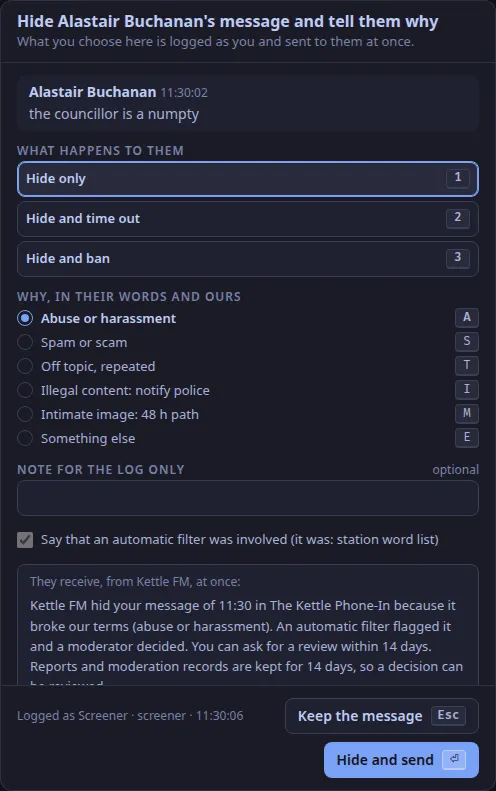
| Key | Does |
|---|---|
1 · 2 · 3 |
hide only · hide and time out · hide and ban |
A · S · T · I · M · E |
the reason: abuse or harassment · spam or scam · off topic, repeated · illegal content · intimate image · something else |
⏎ |
hide and send (a focused button takes its own ⏎) |
Esc |
close it and keep the message; in the note field, the first Esc leaves the field |
Tab, Space, arrows |
the dialog’s own buttons and choices |
⌃T (held) |
talk to the presenter, as on the tab |
Schedule tab
Section titled “Schedule tab”| Key | Does |
|---|---|
← → |
the week before, the week after |
T |
today’s week |
Tab, ⏎ on a block |
reach a block, open it in the editor (the browser’s own keys) |
Nothing on the schedule is live, so no key here is two-press; the global keys fire as on every tab, and a text field in the editor owns the unmodified keys.
Carts tab
Section titled “Carts tab”| Key | Does |
|---|---|
a cart’s key (1–6, Q–Y, A–H, Z–N) |
fires it; again, fades it out |
⇧ and a cart’s key |
cues it in the presenters’ and DJs’ headphones only; again, takes it out |
Space |
fades the cart started last on air |
⇧Space ⇧Space |
fades everything sounding |
arrows, then ⏎ |
move between carts without firing, then fire the one reached (⏎ on any other control is that control’s own) |
Esc |
takes every cued cart out of the headphones |
See Cart wall.
The presenter kit, with presets on ⌥1 to ⌥4, is planned for release two (ADR-0207, Presenter kit).
Text and images CC BY-SA 4.0; code samples AGPL-3.0-only, as the code is. Licences.