
Install the studio app on Linux
The studio app comes in three Linux packages for 64-bit Intel and AMD machines (ADR-0015).
They are built on Ubuntu 24.04 LTS, so they run on it and on anything newer. The .deb and .rpm use your system’s own libraries, so on Ubuntu 26.04 they run on its newer ones.
| Your system | Package | Tested on |
|---|---|---|
| Debian, Ubuntu and their relatives | WeaveSignal_<version>_amd64.deb |
Debian 13, Ubuntu 24.04 and 26.04 |
| Fedora and other RPM systems | WeaveSignal-<version>-1.x86_64.rpm |
Fedora 43 and 44 |
| Any other desktop | WeaveSignal_<version>_amd64.AppImage |
all five above |
The app drives the desk; it does not join the room itself, because WebKitGTK on Linux has no WebRTC. Presenters and guests join from a browser.
Download it
Section titled “Download it”Download the package for your system and the checksum file SHA256SUMS-1.0.0 from the assets of release v1.0.0 on the Forgejo; the updater reads the same files from https://weavesignal.top/updates/.
To build the packages yourself instead, run just package-desktop in the repository (Packages and install files). They land in dist/desktop/ with their checksum file.
Check the download
Section titled “Check the download”Each release lists the packages’ SHA-256 checksums in SHA256SUMS-<version>.
In the folder you saved both to, compare them:
sha256sum -c --ignore-missing SHA256SUMS-1.0.0It prints OK beside the package. If it prints FAILED, delete the file and do not install it.
Install the .deb
Section titled “Install the .deb”sudo apt install ./WeaveSignal_1.0.0_amd64.debapt installs WebKitGTK 4.1 and GTK 3 with it.
Install the .rpm
Section titled “Install the .rpm”sudo dnf install ./WeaveSignal-1.0.0-1.x86_64.rpmRun the AppImage
Section titled “Run the AppImage”The AppImage carries WebKitGTK and its other libraries, and needs nothing installed:
chmod +x WeaveSignal_1.0.0_amd64.AppImage./WeaveSignal_1.0.0_amd64.AppImageIt needs FUSE 2 to mount itself. Where FUSE is missing, run it with --appimage-extract-and-run.
Start it
Section titled “Start it”Choose WeaveSignal from your desktop’s menu, or run weavesignal-studio.
The menu entry starts it with WEBKIT_DISABLE_DMABUF_RENDERER=1, because WebKitGTK’s DMA-BUF renderer crashes the window on native Wayland; when you start it from a terminal on Wayland, set it yourself:
WEBKIT_DISABLE_DMABUF_RENDERER=1 weavesignal-studioThe AppImage always sets it: it starts the app through the same menu entry.
weavesignal-studio --version prints the version without opening a window.
Newer versions come through the app itself: Update the studio app.
Connect to your station
Section titled “Connect to your station”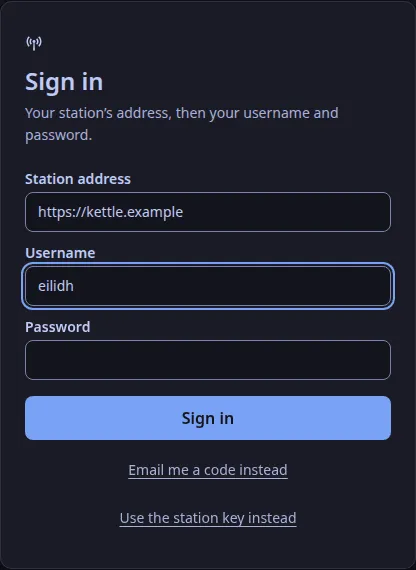
The first time the app opens, it asks for your station’s address and who you are.
Type the address as you would in a browser, with no path: https://radio.example.org.
Then give your username and password, or choose “Use the station key instead” (the first admin does, before any account exists).
- https works for any host and any port, such as
https://radio.example.org:8443. - Plain
http://works only for this computer and private networks:localhost,127.0.0.1,192.168.x.x,10.x.x.x,172.16.x.xto172.31.x.x, link-local addresses, IPv6fc00::/7, and100.64.x.xto100.127.x.x, which Tailscale gives each machine on a tailnet. A host name other thanlocalhostis never counted as nearby over plain http, because a name can point anywhere and the app does not look names up. Use https for it. The reason: your password or key goes with every request, and it must not cross the internet in clear. - The key or session goes into your computer’s keychain, and the window never holds it. Signing out keeps the address, so the next sign-in only asks for your name and password.
Remove it
Section titled “Remove it”sudo apt remove weave-signal # the .debsudo dnf remove weave-signal # the .rpmThe package is called weave-signal, the Tauri bundler’s spelling of WeaveSignal.
For the AppImage, delete the file.
Verified on a development workstation · 2026-11-01: packages built from the repository on Ubuntu 24.04; just package-desktop-test installed each package in a throwaway container of each system above and ran --version; the .deb on Debian 13, the .rpm on Fedora 44 and the AppImage on Ubuntu 24.04 opened the desk on a virtual X display (Xvfb, software rendering) and kept running; removing the .deb and the .rpm left no app files.
Wayland and a real GPU were not tried.
Text and images CC BY-SA 4.0; code samples AGPL-3.0-only, as the code is. Licences.