
Take a caller to air
A caller rings in from the station’s player page (ADR-0006), agrees to be recorded, and waits in the screener’s queue. The screener talks to each caller first, then sends one to you (Screen callers). A caller sent to the desk takes slot 4. A caller without consent to record cannot be sent to you.
When a caller is sent to you
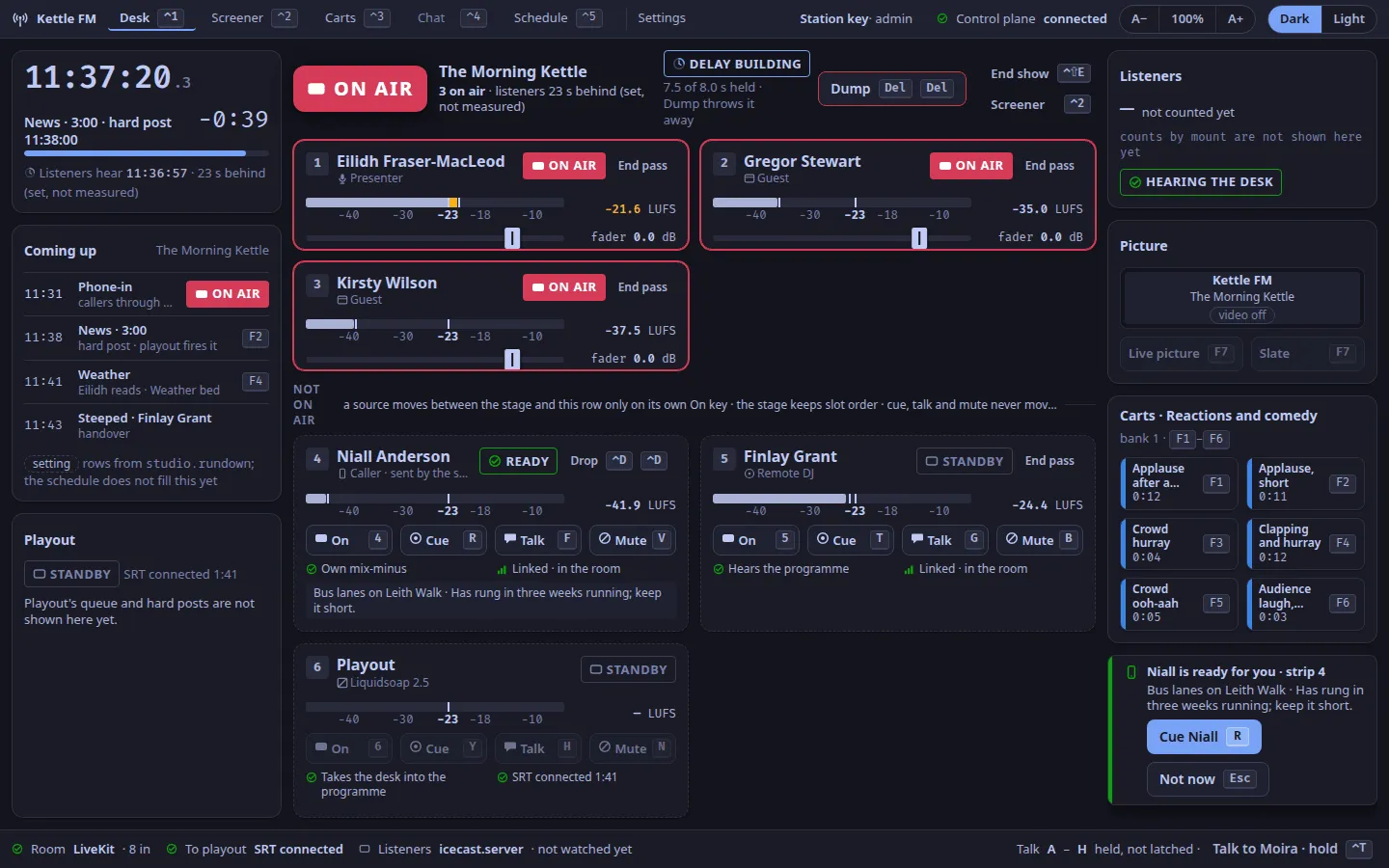
Section titled “When a caller is sent to you”The toast slot (desk.toast) says ⟨name⟩ is ready for you · strip 4, with the screener’s one line and note under it.
The caller’s tile says READY.
- Press
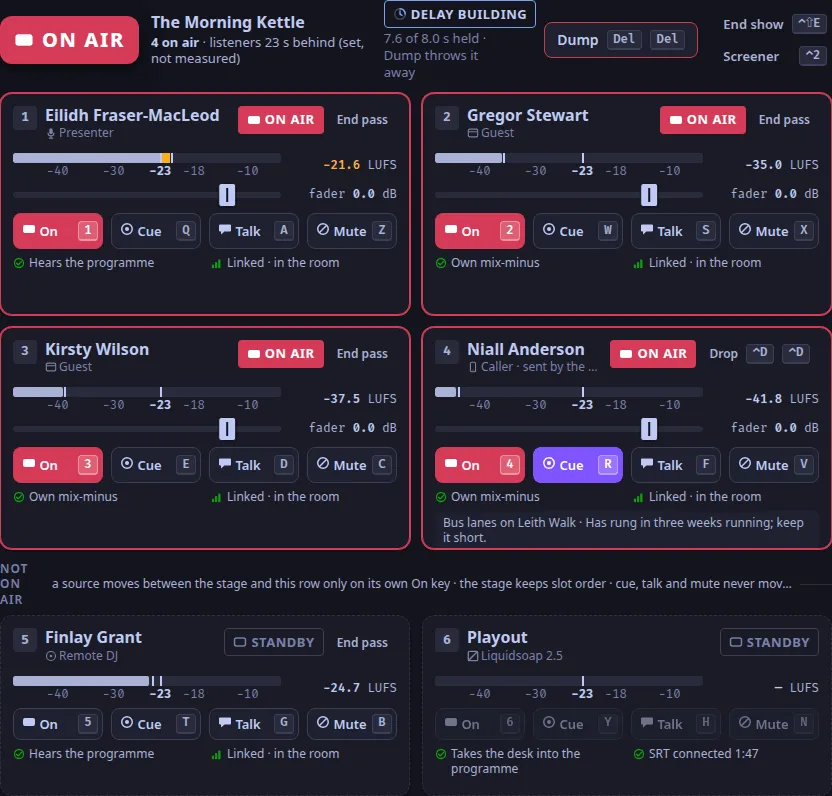
R, the cue key of slot 4, to accept them (ADR-0098). They are cued: you hear them in your headphones, and listeners do not. - Talk to them off air if you need to: hold
F, slot 4’s talk key. - Press
4to put them on air. - Press
4again to take them off air at the end of the call.
When you cannot take them now
Section titled “When you cannot take them now”Press Esc (Not now) while the toast is showing.
The caller stays ready, now with DESK BUSY, and the screener is told you declined (ADR-0069, ADR-0098).
The screener can send them again when you are free.
Drop a caller
Section titled “Drop a caller”Press ⌃D twice within 3 s.
The first press arms the key and counts down; any other key, or Esc, disarms it.
On the desk, ⌃D ⌃D drops the caller in slot 4: off air, out of the room and out of the queue.
A deliberate drop leaves no held place (ADR-0101).
If a caller’s link drops
Section titled “If a caller’s link drops”A caller whose connection is lost keeps their place in the queue for 5 minutes, marked DROPPED, so they can rejoin where they were (ADR-0101).
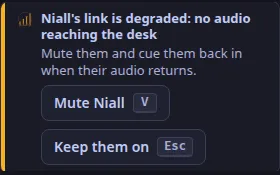
If they were on air, the toast says their link is degraded, or that they left the room, and offers Mute ⟨name⟩ (V) or Keep them on (Esc).
The desk keeps their strip for 30 s (the desk’s room.leave_grace_ms); if they rejoin within it, they are mixed again.
If a caller says the studio is too quiet
Section titled “If a caller says the studio is too quiet”A caller hears the studio at about −23 LUFS, a usual level for a call; listeners hear the stream lifted to −16 LUFS (ADR-0205, ADR-0044). On a phone, a call has its own volume, apart from music’s: ask them to press volume up during the call. The call page says the same under Trouble hearing or being heard?: “Studio too quiet? On a phone, press volume up once the call has started: a call has its own volume, apart from music’s.”
If a caller says the studio breaks up
Section titled “If a caller says the studio breaks up”The desk sends each caller’s return evenly timed: measured with WebRTC getStats on the receiver, 0.0 % of it was concealed, locally and over the internet (What release one does).
Gaps a caller still hears come from their network.
The desk sends without congestion control (a known limit: its image lacks GStreamer’s rtpgccbwe), so a caller on a poor link may hear more loss than a browser-to-browser call would give.
If a caller cannot get through at all (a blocked microphone, a phone on an IPv6-only network), see When a call does not work.
Verified by the control plane’s tests (the screener sends a caller, the desk declines, the screener drops) and a keyboard-only run of the studio app against the real desk, 2026-10-25; checked against the code on 2026-11-04.
Text and images CC BY-SA 4.0; code samples AGPL-3.0-only, as the code is. Licences.