
Schedule
The Schedule tab (⌃5): the toolbar, the week grid on the left and the editor column on the right (ADR-0021, ADR-0045, ADR-0055).
Each panel is a heading below, named as it is on screen (ADR-0070).
The grid is drawn by a calendar library behind a small adapter, so another library could drop in without the rest of the tab changing; it is drawn with Event Calendar (ADR-0185).
Times on the grid are the station’s wall clock in its own zone (chosen once in Settings; until then the station offers publishing.zone and asks an admin to confirm it), whatever the machine’s zone: a clocks-back Sunday has 25 hours and says so in its header; a clocks-forward one has 23.
calendar.frame
Section titled “calendar.frame”Not drawn on the tab: the app’s own frame, studio.frame, is above every tab.
calendar.toolbar
Section titled “calendar.toolbar”| Part | What it does |
|---|---|
‹ › (← →) |
the previous and next week |
Today (T) |
back to this week |
| the range | the week’s dates |
| Week, Studios | the view; Studios is planned and says it is not in this build: studios as columns wait for a studio on each show |
| the zone | the station’s time zone, and its clock change if one falls this week |
| Choose the time zone… | shown to an admin until someone has chosen the station’s zone; opens Settings |
| New show | the new-show form in the editor column |
| the legend | Live, automation, an instance of a weekly rule, conflict, aired |

calendar.week
Section titled “calendar.week”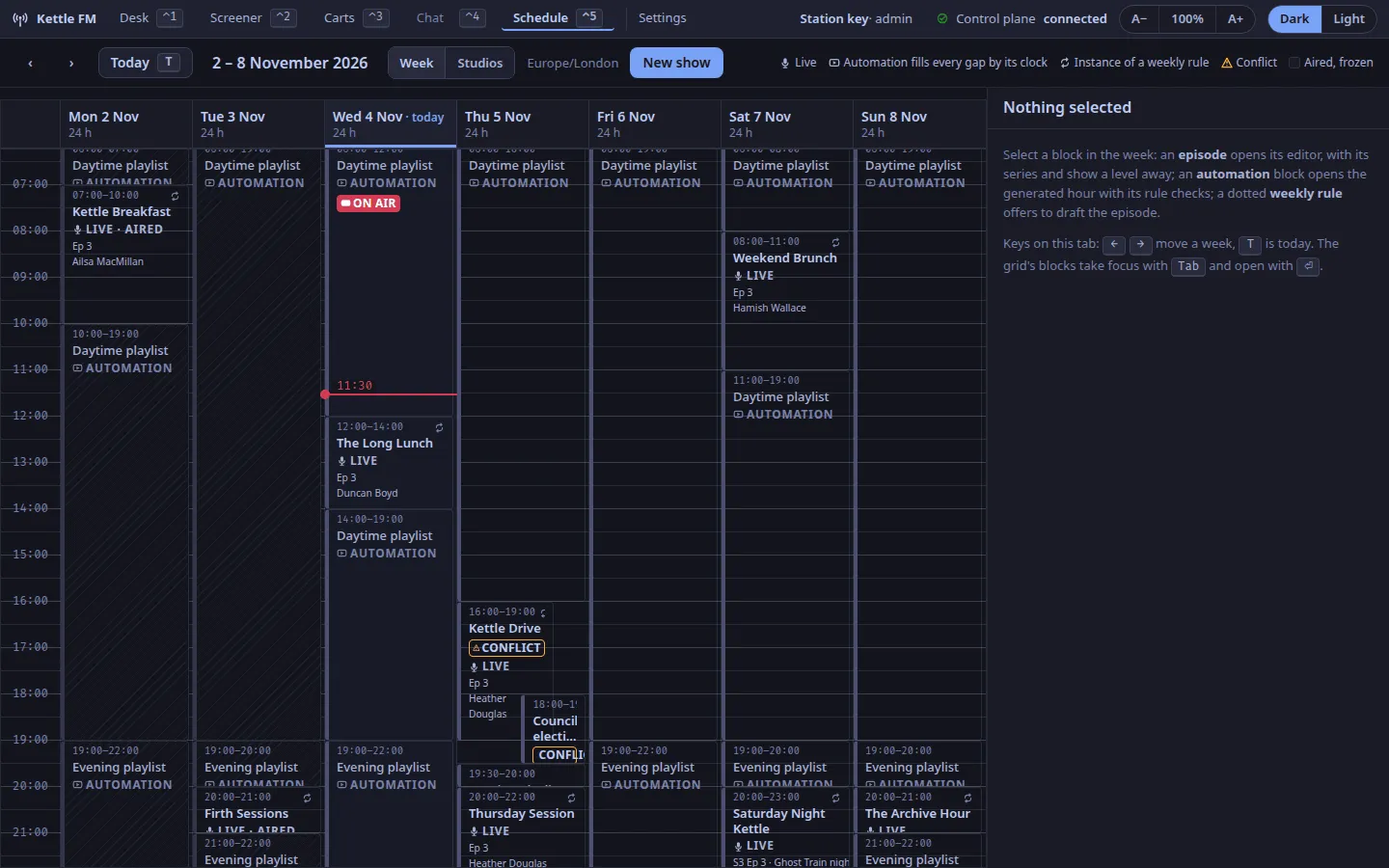
A time axis and seven days; every block is placed by its start and length, in station time.
| A block says | When |
|---|---|
the show’s name, its times, a left band in its colour (ADR-0066), LIVE, Ep 212 or S3 Ep 7 · its title, the hosts |
an episode |
| the repeat glyph by the time | the show has a weekly rule and this is one of its instances |
| MOVED · was 07:00 (or · was Mon 07:00, moved to another day) | an instance moved off its rule’s time this week |
| CONFLICT, on both | two episodes overlap in time |
| ON AIR | the block the station’s clock is inside now |
| LIVE · AIRED on a dimmed surface | it has gone out: aired episodes are frozen (ADR-0055) |
| NOT DRAFTED and Weekly rule · draft it, dotted | a show’s weekly rule where no episode is drafted yet; select it to draft the episode |
| AUTOMATION, hatched, named by its clock | every gap, filled by the clock that runs each local hour (ADR-0045); it never conflicts, it yields |
Every episode’s block says LIVE, whatever its kind: the grid does not yet show a pre-recorded episode differently.
A block takes focus with Tab and opens with ⏎; a future episode can be dragged or resized with the pointer, and snaps back with the reason if the control plane refuses.
calendar.episode-editor
Section titled “calendar.episode-editor”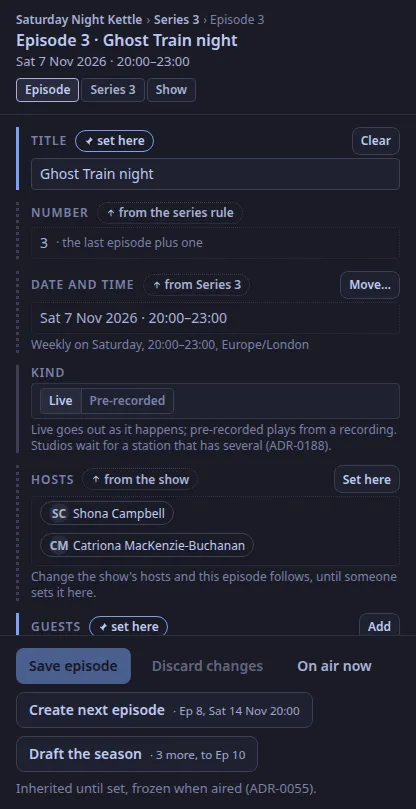
The selected episode: its path (show › series › episode), its date and a TONIGHT, ON AIR or AIRED chip, and a level switch (Episode, Series n, Show). The same column, under the same name, holds the new-show form, a dotted weekly rule’s Draft this episode, and Nothing selected. Every field carries one of three markers:
- inherited (dotted; “from Series 3”, “from the show”, “from the series rule”): the field follows the level above by reference until Set here;
- set here (an accent border): this episode’s own, with Clear or Reset to series;
- as aired (a lock): read-only, the value as broadcast.
Fields: title, number (from the rule, the last plus one), date and time (Move… is the keyboard alternative to dragging; Back to the rule puts a moved instance back), kind (Live or Pre-recorded, ADR-0188; every episode is live until marked, and playout does not yet treat a pre-recorded one differently), hosts, guests (always per episode), description, tags, artwork and card layout (Card… opens the card editor), and Up next on the player, the station setting that is off for a US statutory webcaster. The foot: Save episode (only what changed) and Discard changes, Create next episode (its number and time from the rule, across the clock change) and Draft the season (every planned episode not yet drafted). On air now freezes the episode as broadcast and draws its cards once more. Nothing freezes an episode by itself yet: the desk going on air does not, so someone presses it when the show goes out.
calendar.series-editor
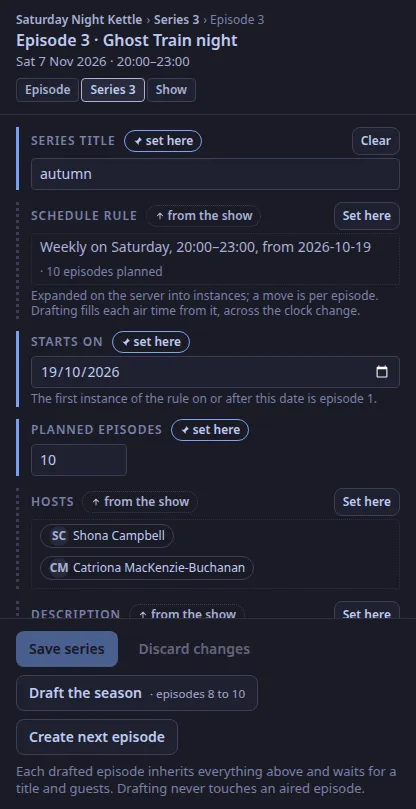
Section titled “calendar.series-editor”The series level: the title, the schedule rule (weekly on a day, a start, a length; Reset to show inherits the show’s again), the start date, the planned count, the hosts, the description and the tags, each inherited from the show until set; which episodes have aired, are drafted, or wait; Save series, Discard changes, Draft the season and Create next episode.
calendar.show-still
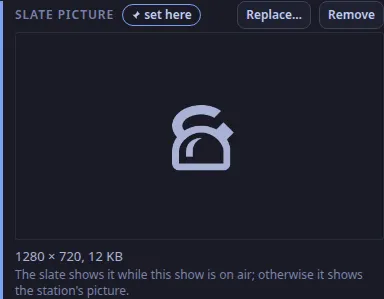
Section titled “calendar.show-still”The Slate picture field on the show level of a saved show (ADR-0200): a preview of the picture the video slate shows while this show is on air, its size, Choose… or Replace… a PNG or JPEG, and Remove. The station reads the picture in its sandbox and says why when it refuses one. A show without a picture of its own gets the station’s on the slate.
calendar.aired-episode
Section titled “calendar.aired-episode”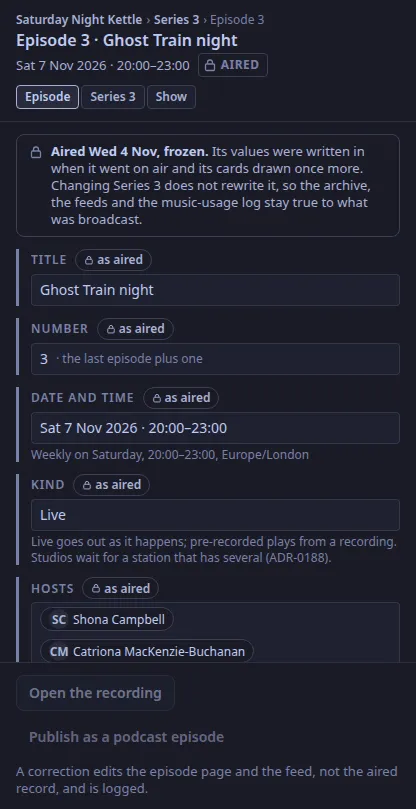
An aired episode, frozen: every field as broadcast, with the lock, and the note that changing the series does not rewrite it. Correct the public text… on the Corrections field opens a form with the title, description, hosts, guests and tags as aired and a required Why; Publish correction sends only what you changed (ADR-0177). Under it, the corrections log: when, who, why, and each field as it was and as it became. The Music used line points at the per-play log for its hours. Open the recording and Publish as a podcast episode are shown but greyed out: both are planned.
calendar.log-editor
Section titled “calendar.log-editor”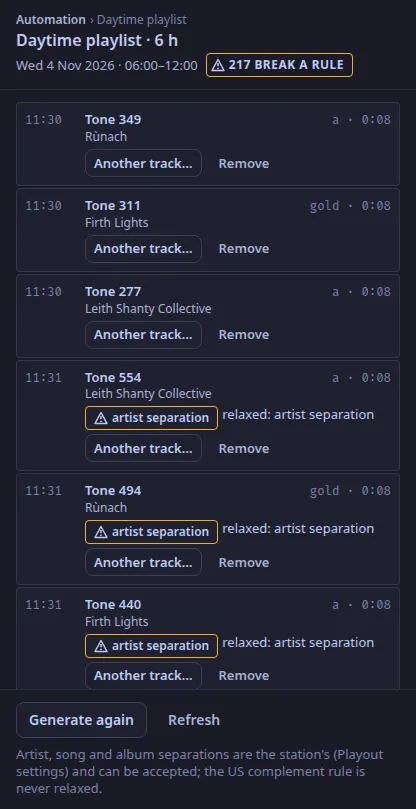
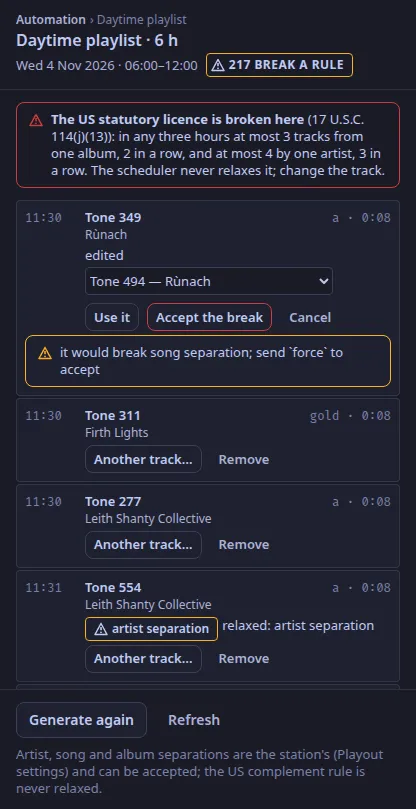
Select an automation block: the generated hours it stands for, item by item, with the rule each breaks in the scheduler’s words. Another track… offers the library by category, and Use it puts the choice in; the control plane checks it against the rules and refuses with the reason. The station’s own separations can be accepted with Accept the break; a break of the US statutory licence (17 U.S.C. 114(j)(13)) is never accepted. Remove takes an item out; Generate these hours fills an empty future hour (Generate again once it has items), and Refresh reads the log again. The control plane keeps the log generated 26 hours ahead by itself.
calendar.card-editor
Section titled “calendar.card-editor”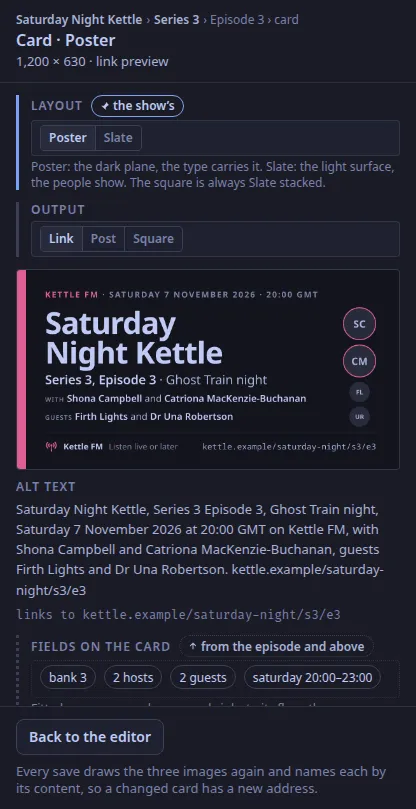
The card for the selected episode or show: Poster or Slate (ADR-0067), the output (link, post, square), the preview drawn by the control plane from the same fields a save would use, the alt text in its fixed order, and the page the card links to (ADR-0056). A field the renderer refuses, such as a show name that does not fit even at its floor, is shown with the field named; the save would be refused the same way. Keep for the show saves a tried layout as the show’s.
Text and images CC BY-SA 4.0; code samples AGPL-3.0-only, as the code is. Licences.