
Desk
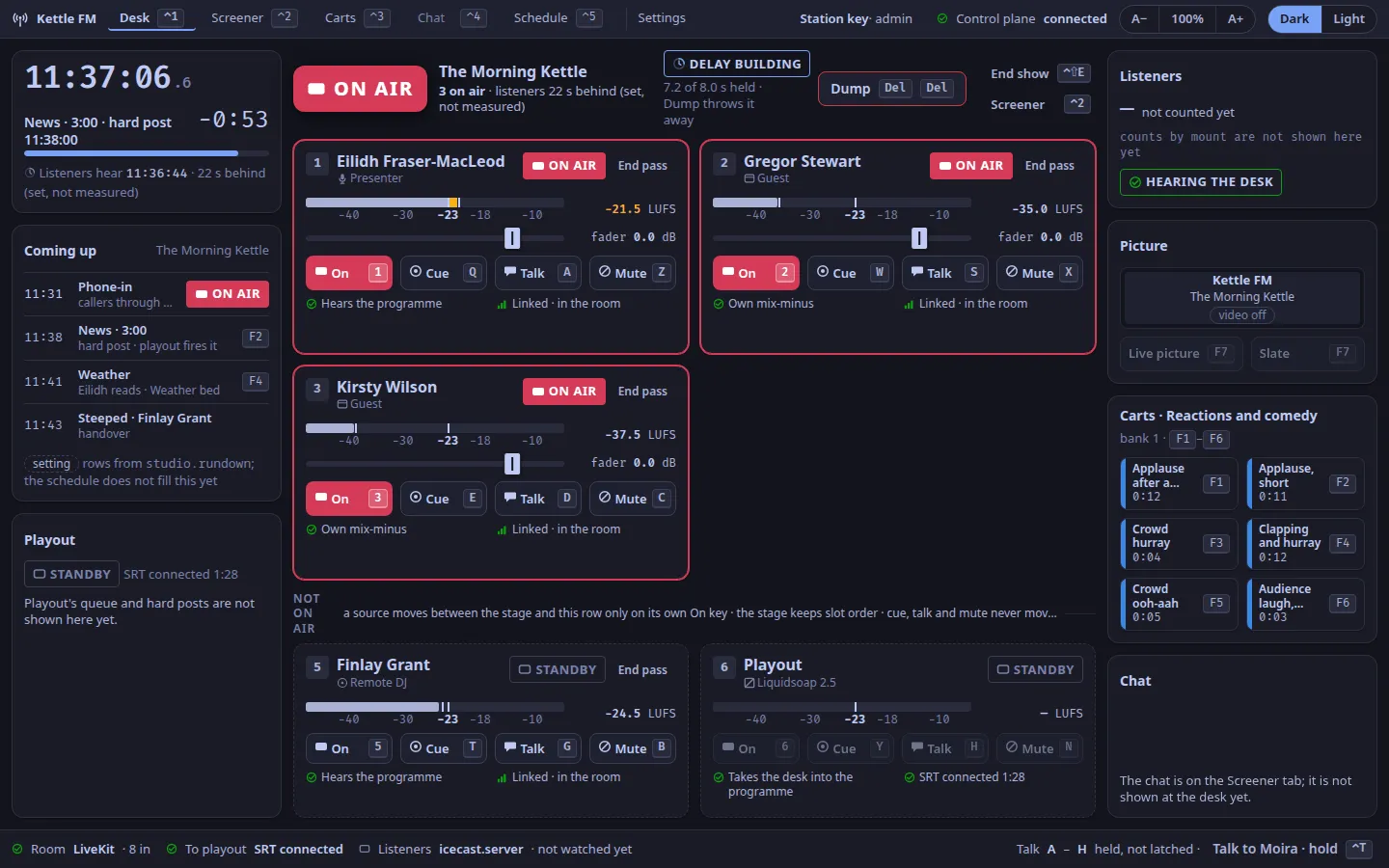
The desk is the studio app’s first tab (⌃1); its layout is the one the design called desk B, the focus (ADR-0061).
Time is on the left, what is on air in the middle, the station on the right, and the station’s health along the foot.
Each heading below is a panel’s name, as it is on screen (ADR-0070). Hover over a panel’s header, or focus it with the keyboard, to see its name and one line on what it is; a bug report asks for the name. The name never covers a live control and never takes a key.
desk.clock
Section titled “desk.clock”The studio clock: room time with tenths of a second, and back-timing to the next hard post in the rundown, with a bar that fills as it nears.
Under it, the time listeners are hearing.
That time is the setting studio.listener_delay_ms (15 s by default) plus how much the profanity delay holds now (8 s when full, by default), so 23 s with the delay full and 15 s just after a dump (ADR-0103, ADR-0165).
It is not measured live, and the line says set, not measured; the rehearsals measured about 22.5 s on loopback and 11.8 to 18.4 s over the internet.
Measuring it live is planned.
desk.rundown
Section titled “desk.rundown”Coming up: the next rows of the show, with their times, which is a hard post, and the cart key each needs.
The rows come from the setting studio.rundown (ADR-0102, Set the show); the Schedule tab does not fill them, and rows from the schedule are planned.
desk.playout
Section titled “desk.playout”Playout (Liquidsoap): whether it is connected to the desk, and for how long.
While listeners hear the default loop WeaveSignal ships, because the station has no fallback files of its own, a Default loop chip and a line say so; adding fallback files takes it away (Playout).
While playout is down the panel offers Restart playout (⌃R), which only shows a note in 1.0.0: restart Liquidsoap on the server (When the lamp says PLAYOUT DOWN).
Playout’s queue and hard posts are not shown (planned).
desk.stage
Section titled “desk.stage”The stage: the show’s title, the master lamp and the delay above, End show (⌃⇧E, a note only in 1.0.0) and Screener (⌃2), and every source the room has on air, as tiles.
A source moves onto the stage only on its own On key, and the stage keeps slot order (ADR-0061).
While playout is down the stage says Room alive, with how many sources are open to the room; in auto mode it says Automation holds the air, and the open sources say OPEN.
desk.lamp
Section titled “desk.lamp”The master lamp: ON AIR when listeners can hear the room, or what they hear instead: STANDBY, PLAYOUT DOWN, or FAULT.
In auto mode, when automation holds the air and the desk never reaches listeners, it says AUTO instead: a hollow lamp in its own mint colour with a play mark (ADR-0183).
Hover over the word, or reach it with Tab, for one sentence on what it means and what to do.
See The state vocabulary for every state word drawn in both themes, and the rules for the master lamp.

desk.delay
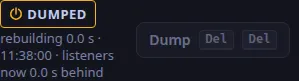
Section titled “desk.delay”The profanity delay, its length and the two-press dump (Del Del).
The dump throws away whatever the delay holds, even while it is still building back up, so some protection is never refused; the ring shows how many seconds are held (ADR-0166).
Only a delay that holds nothing, such as the moment after a dump or a desk start, cannot be dumped.
The panel says Delay off when the desk runs with no delay.
desk.tile.1
Section titled “desk.tile.1”Source 1 as a tile: the person’s name and role, their state word, an R128 loudness meter with its scale and the −23 LUFS target, a fader drawn at 0.0 dB, and the four keyed buttons, On, Cue, Talk and Mute, with their keys printed on them.
Under them, what the person hears and whether their link reaches the desk (LINK DEGRADED when it does not).
A presenter’s, DJ’s or guest’s tile has End pass (two presses, ADR-0119); a caller’s has Drop (⌃D ⌃D).
Slot 1 is the presenter’s.
Not in 1.0.0 (planned): a working fader (the drawn one does not move), link loss and jitter figures, and a camera picture in the tile (the cameras’ pictures are in desk.picture).
desk.tile.2
Section titled “desk.tile.2”Source 2: a guest.
desk.tile.3
Section titled “desk.tile.3”Source 3: a guest.
desk.tile.4
Section titled “desk.tile.4”Source 4: a caller, once the screener sends one.
A caller sent to the desk shows READY, and a toast offers Cue with the slot’s cue key (R in slot 4) or Not now (Esc).
If slot 4 is taken, a caller takes the first free slot of 3, 2, 5 and 1, and their keys are that slot’s.
desk.tile.5
Section titled “desk.tile.5”Source 5: a DJ.
desk.tile.6
Section titled “desk.tile.6”Source 6: playout, with its SRT link to the desk. Playout as a desk source with its own switch is planned; its On, Cue and Mute keys show a note.
desk.waiting
Section titled “desk.waiting”Not on air: the sources in the room that are cued or standing by, and playout’s tile (slot 6), with the move rule. A source here keeps its slot and its keys (ADR-0096).
desk.audience
Section titled “desk.audience”Listeners now: the number connected to the station’s stream, counted every five seconds, or “not counted yet” while the listener process does not answer. Under the figure, a chip says what listeners hear: HEARING THE DESK, PLAYOUT DOWN, or ON AUTOMATION while the station is in auto mode (The state vocabulary). When video is on, more than about 500 are connected and the station has no CDN or edges configured, the panel also warns that video needs a CDN (Put Bunny in front of the station, ADR-0017). Counts by mount are planned.
desk.picture
Section titled “desk.picture”The programme picture: the live picture or the slate, switched with F7.
Under the switch are a small picture of each camera the desk sees, the one on air marked (refreshed every two seconds), and the slate’s picture: Choose a slate picture takes a PNG or JPEG for the slate to show above its words, Remove takes it away (Video in the desk).
With video off the panel says so and the switch is disabled.
desk.carts
Section titled “desk.carts”The glance: the top row of the show’s cart bank, fired with F1 to F6 from any tab.
The cart wall is the Carts tab (⌃3): see Cart wall (ADR-0020).
desk.chat
Section titled “desk.chat”The chat glance.
In 1.0.0 the panel only says the chat is on the Screener tab (⌃2); the glance is planned.
desk.toast
Section titled “desk.toast”The reserved slot a toast takes, in place of the chat glance, so nothing moves and no control is covered. One toast at a time, most urgent first:
- a note you asked for, such as a key that is not in 1.0.0;
- Playout down · room alive, with how long the link has been down;
- a caller ready for you, with Cue and Not now;
- a source on air whose link is degraded or who left the room, with Mute and Keep them on;
- the latest notice for the desk, for 20 s.
desk.status
Section titled “desk.status”The station’s health in one line: the room and how many people are in it, the link to playout (with Restart ⌃R, a note only, while it is down), the listener server, a degraded link if any, the talk rule (talk keys A to H are held, not latched), and Talk to the screener, held, as ⌃T is.
The listener server is shown as not watched; its health and the logger on the desk are planned.
Text and images CC BY-SA 4.0; code samples AGPL-3.0-only, as the code is. Licences.