
Screen callers
This is for the screener, on the studio app’s second tab (⌃2).
You join the room with the screener role.
You hear every caller, waiting or on air; a caller hears you only while you hold T (ADR-0095).
Listeners never hear you.
Pick a caller
Section titled “Pick a caller”Callers wait in screener.queue in the order they arrived, each with a number.
Press ↑ or ↓ to move, or 1 to 9 to jump to a caller.
A caller marked BANNED BEFORE carries the date and reason; nothing of theirs is on air, so screen them or drop them.
The list behind it is the station’s studio.banned setting; it does not yet come from the chat’s moderation log (What release one does).
A caller who rang in from the player page shows the line they typed about the call, and a no consent tag if they did not agree to be recorded.
Talk to them
Section titled “Talk to them”Hold T.
The first T on a waiting caller starts screening: their state becomes SCREENING (ADR-0100).
While you hold it, the caller hears you and the programme; let go, and they hear only the programme.
Write for the presenter
Section titled “Write for the presenter”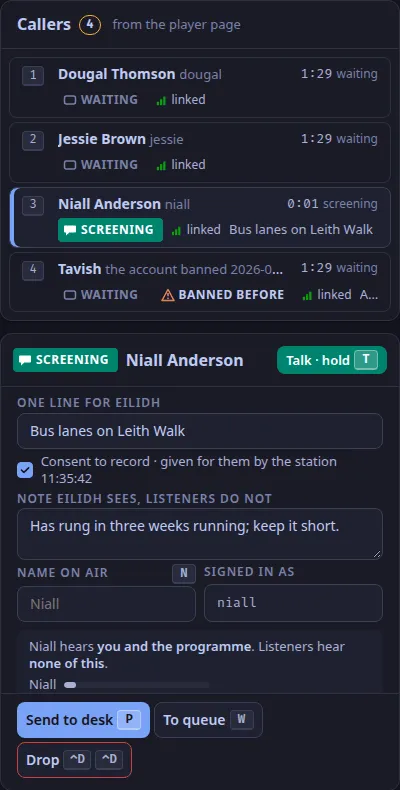
In screener.screening:
- One line for the presenter: what the call is about.
- Note: what the presenter should know and listeners should not.
- Name on air: press
Nto type it, andEscto leave the field.
While you type, the screener’s letter keys do nothing, so a P in a note sends nobody.
Send them to the desk
Section titled “Send them to the desk”Press P (Send to desk).
A caller with no consent to record on file cannot be sent, and Send to desk stays disabled: drop them, and they can call again from the player page.
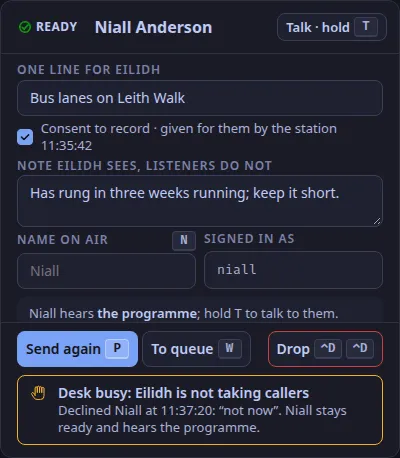
The caller becomes READY and takes slot 4 on the desk; the presenter sees your line and note.
Press W (To queue) instead to put them back in the queue (not while they are on air).
If the presenter declines, the caller stays ready with DESK BUSY and hears the programme, and screener.status says the desk is not taking callers.
Press P (Send again) when the desk is free.
When the presenter takes them, your toast says so.
Talk to the presenter
Section titled “Talk to the presenter”Hold ⌃T: your voice is in the presenter’s headphones only.
Drop a caller, or let a place go
Section titled “Drop a caller, or let a place go”⌃D ⌃Ddrops the selected caller: off air, out of the room, out of the queue.- A caller whose link was lost keeps their place for 5 minutes, marked DROPPED;
⇧Clets that place go sooner (ADR-0101).
The chat’s modes
Section titled “The chat’s modes”S slow mode, K hold new accounts, L links for trusted chatters only, and G G influx, which sets five things at once and undoes them with the same key (ADR-0068).
The chat’s reports, held messages, statement of reasons and the room itself are in Moderate the chat.
Verified by a keyboard-only run of the studio app against the real desk on a loopback stack (2026-10-25) and by the control plane’s tests; checked against the code on 2026-11-04.
Text and images CC BY-SA 4.0; code samples AGPL-3.0-only, as the code is. Licences.