
Install on Cloudron
Package 1.0.0, amd64. Listed on ca.cloudron.io, the community app catalogue: https://ca.cloudron.io/app/top.weavesignal.cloudronapp. The package’s source is in the repository, in
deploy/cloudron/.
One Cloudron app holds the whole server (ADR-0022): the control plane, the chat, the desk, Liquidsoap 2.5 for playout, the listener process with icecast.server, LiveKit with its built-in TURN, the public pages, and nginx in front of them.
PostgreSQL is Cloudron’s addon (ADR-0082), and the chat’s and staff’s sign-in codes go out through Cloudron’s mail (the sendmail addon).
The app’s id is top.weavesignal.cloudronapp.
Before you start
Section titled “Before you start”- A Cloudron at version 10.0 or later.
- A server that is not overloaded. On a heavily shared server the listener stream ran dry even with a 3 s cushion (Memory and CPU). A busy Cloudron is fine for checking that the station works; a station on air gets a server of its own.
- If the server has IPv6, read IPv6 and TURN first.
Install
Section titled “Install”-
In your Cloudron’s dashboard, open App Store and choose Community apps.
-
Paste the catalogue address:
https://forgejo.weavesignal.top/WeaveSignal/weavesignal/raw/branch/main/deploy/cloudron/CloudronVersions.json -
Choose Install. Updates arrive through the same catalogue.
Or from the command line, with the Cloudron tool logged in:
cloudron install --versions-url https://forgejo.weavesignal.top/WeaveSignal/weavesignal/raw/branch/main/deploy/cloudron/CloudronVersions.json --location studio.example.comCloudron asks for four domains and the public ports:
| Cloudron asks for | Choose, for example | What it serves |
|---|---|---|
| The app’s own domain | studio.station.example |
the studio: /health, the studio’s and the chat’s admin routes; behind Cloudron’s login when the app uses Cloudron’s users |
| Listener stream | listen.station.example |
/programme.opus only (and the MP3 stream when it is on) |
| Live room signalling | room.station.example |
LiveKit’s WebSocket; guarded by short-lived room tokens (ADR-0085) |
| Public pages | station.example |
the player with call-in and the live chat, the invite page, the echo test, podcast feeds, show cards and episode files, and only their public routes |
| Live room media (UDP) | 7882 | any free UDP port; not 50000–51000, Cloudron’s own TURN relay range |
| TURN over TLS | 15349 | Cloudron’s own TURN holds 5349 (ADR-0106); any free TCP port |
| TURN over UDP | off | Cloudron’s own TURN holds 3478; 3479 if you turn it on |
| Live room media over TCP | off | 7881 if you turn it on; TURN over TLS reaches the same guests |
Every port stays a setting you can change later in the app’s settings (ADR-0075). Open the media port and the TURN port, and any optional port you turn on, in the server’s firewall and in any cloud provider’s firewall.
Install with Cloudron’s user management to put the app’s own domain behind Cloudron’s login.
/health stays open without a login (ADR-0160), and a request with a staff session or the station key as its bearer still reaches the control plane’s routes.
The login cannot be added to an app already installed, which is why the package declares it from the start.
From your own build
Section titled “From your own build”To build the image yourself, from the repository’s root:
podman build -t registry.station.example/weavesignal-cloudron:1.0.0 -f deploy/cloudron/Dockerfile .podman push registry.station.example/weavesignal-cloudron:1.0.0The Dockerfile needs the repository’s root as its context and uses build caches, so it is built on your machine, not by Cloudron.
Push it to a registry the Cloudron can pull from (a private one needs a read-only token in Cloudron’s private-registry settings), then install with --image and that name.
Sign in
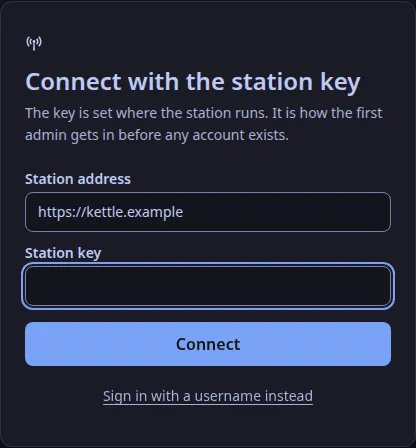
Section titled “Sign in”- In the studio app, connect to
https://studio.station.example(the app’s own domain). - Choose Use the station key instead and give
CONTROL_ADMIN_TOKENfromsecrets.env(below). - Add yourself as an admin under Settings → Staff, then sign in as yourself (The first admin).
Each member of staff then gets their own account there.
The station’s files
Section titled “The station’s files”The app writes two files in /app/data on its first start; open them with Cloudron’s File Manager, and restart the app after an edit.
| File | Holds |
|---|---|
weavesignal.env |
the station’s settings: STATION_NAME, ROOM_NAME, LISTENERS_AUTH, LISTENERS_MOUNT, NODE_IP, CONSENT_CONTACT, FEED_BUFFER_S, MAIL_MODE, PUBLISHING_URL, PUBLISHING_PLACE, PUBLISHING_ZONE, SEARCH_LISTING, DIRECTORY_LISTING, the MP3 stream (COMPAT_STREAM, COMPAT_MOUNT, COMPAT_BITRATE), playout’s processing (PROCESSING, PROCESSING_TARGET_LUFS, PROCESSING_MAX_GAIN_DB), the internal ports and LOG_LEVEL |
secrets.env |
made once: STATION_ID, LiveKit’s key and secret, the listener source password, CONTROL_ADMIN_TOKEN, LISTENERS_PASSWORD, and the three keys CHAT_EMAIL_KEY, CONTROL_EMAIL_KEY and CONTROL_TOKEN_KEY |
On every start the package writes each service’s own settings from these two files and from Cloudron’s environment.
A later package adds any setting new to it to weavesignal.env with its default, and makes any new secret in secrets.env; it never changes a line you wrote.
Settings that differ from the Compose bundle:
FEED_BUFFER_Sis 1.5 s, against 0.5 s elsewhere: the listener process’s cushion of playout’s feed. Each second is a second more listener delay; on a quiet server 0.5 s holds.MAIL_MODEiscloudron: sign-in codes go out through Cloudron’s mail, or into/app/data/chat-outboxas files if the addon gives no mail server.outboxandoffare the other values.- Video is off: the package does not turn on the desk’s video path.
STATION_ID is the station’s identity for its whole life (ADR-0047).
/app/data is in Cloudron’s backups, so the three keys and the database are restored together; restore one without the other and chatters’ and staff’s accounts are not found, and API tokens are revoked (The email key).
Open call-in
Section titled “Open call-in”Call-in stays closed until CONSENT_CONTACT is set (ADR-0124).
Set it in weavesignal.env to an email address or a link where callers ask for their call to be taken down, and restart the app.
If guests cannot connect
Section titled “If guests cannot connect”LiveKit may have found the wrong public address: set NODE_IP in weavesignal.env to the server’s public IPv4 address, and restart the app.
Keep the station private
Section titled “Keep the station private”Until the station should be found:
- Unlisted. The stream asks no directory to list it (
DIRECTORY_LISTING=false), and every domain answersnoindex(SEARCH_LISTING=false). - The stream’s password. With
LISTENERS_AUTH=on(the default) the stream asks for the userlistenerandLISTENERS_PASSWORDfromsecrets.env.offleaves it open but unlisted. - The listener domain serves only the mount: it refuses uploads,
icecast.server’s admin pages and/status.json, and drops ICY metadata requests. - The room is guarded by short-lived room tokens (ADR-0085), and the public pages’ domain serves only the public routes. Cloudron’s login covers the app’s own domain only.
The player page cannot play a password-protected stream.
With LISTENERS_AUTH=on, the player’s stream is on the listener domain, and a browser does not ask for a password for audio from another domain, so the page stays silent; players and curl can still play it.
Set LISTENERS_AUTH=off when listeners should hear the station in the page.
IPv6 and TURN
Section titled “IPv6 and TURN”LiveKit’s built-in TURN refuses a client that reaches it over IPv6 (an allocation error, 508). TURN is reached at the app’s own domain, and Cloudron gives an app’s domains an AAAA record whenever the server has IPv6, so a guest who can join only through TURN (a network that blocks UDP, or GrapheneOS’s browser) and reaches the server over IPv6 cannot join. Guests whose media port works are unaffected. There is no setting for it in 1.0.0: on such a server, test a relay-only guest before relying on it (Known limits).
Check it
Section titled “Check it”curl https://studio.station.example/healthcurl -u "listener:$LISTENERS_PASSWORD" -o programme.opus https://listen.station.example/programme.opus/health answers with "database":"ok".
On an app installed with Cloudron’s user management, a request to the app’s own domain without a bearer is sent to Cloudron’s login (a 302 redirect), not refused with 401.
Open https://station.example/ for the player, then issue a room token (Give someone a room token) and join.
Update
Section titled “Update”Install a newer image over the app:
cloudron update --app studio.station.example --image forgejo.weavesignal.top/weavesignal/weavesignal-cloudron:<version>Back the app up first. The station’s files and data stay; database migrations run at the next start.
Memory
Section titled “Memory”The package’s memory limit is 1.5 GiB. Measured with the package’s memory gate, it used about 527 MiB idle and peaked at 699 MiB under load, with the MP3 stream and the processing chain on (Memory and CPU).
Text and images CC BY-SA 4.0; code samples AGPL-3.0-only, as the code is. Licences.