 WeaveSignal
Try the desk
Run a short show on Kettle FM from the studio's real interface, in your browser. The people are pre-recorded. Nothing you press reaches a real station.
A short show. Best with sound on and headphones, on a computer with a keyboard. A guide bar in the app walks you through the same steps.
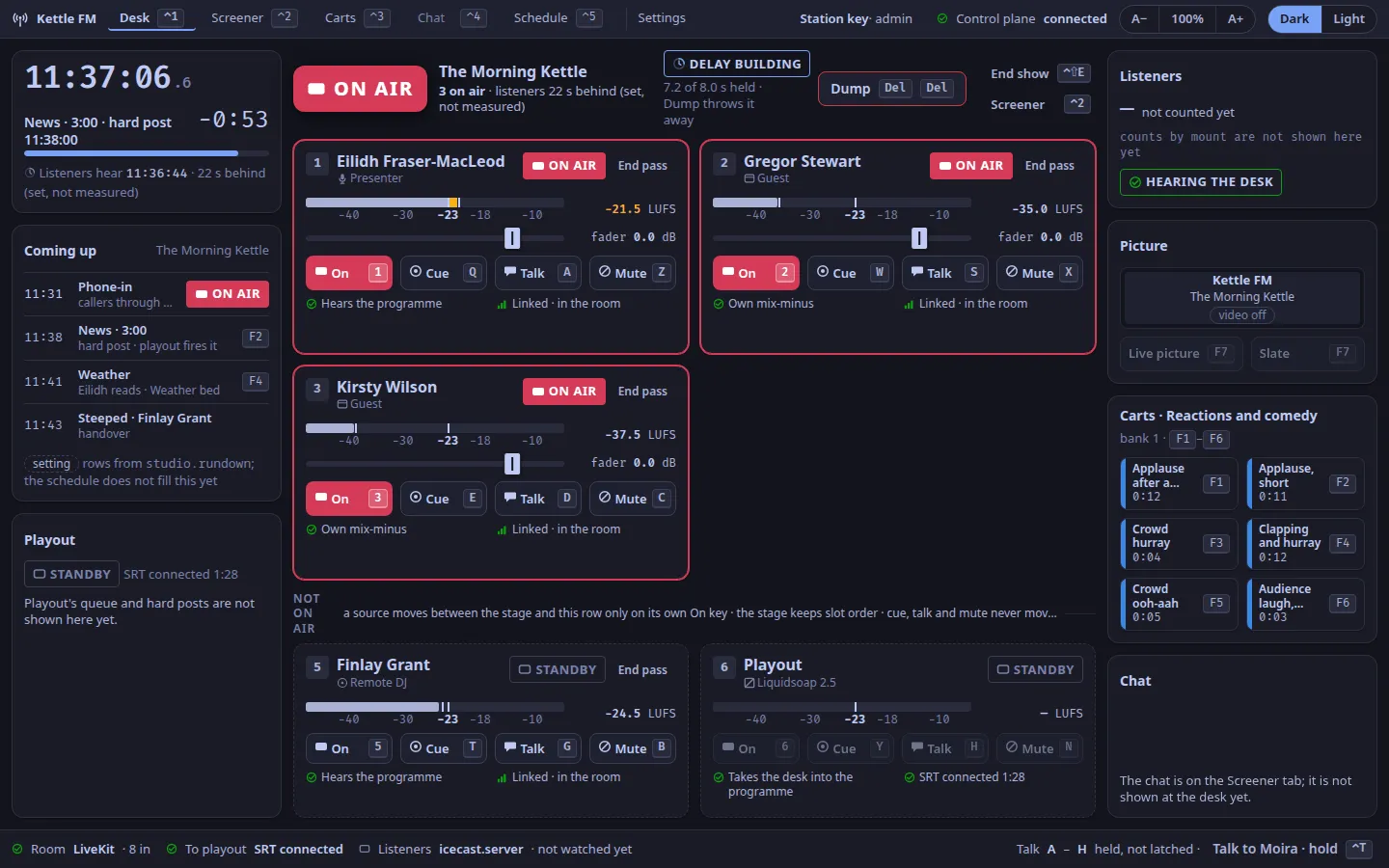
What the sandbox is
The studio app, built for the browser, against a station that is simulated inside the page. There is no server behind it: each visitor has a copy of their own, and reloading the page starts it again. Press Start in the app to turn the sound on, then follow the steps below or the app's own guide bar. A switch in that bar, Hear: Studio / Listeners, lets you listen as the presenter does, or as a listener does, seconds behind.
Who is in the room
Five people, with designed voices: no one is a recording of a real person, and Kettle FM is not a real station.
- Eilidh Fraser-MacLeod
- Presenter of The Morning Kettle
- At the desk, slot 1. You sit in her chair: her keys are yours, and her voice is on the recording.
- Gregor Stewart
- Guest, a local historian
- Joined the room from an invite link, slot 2. He hears the show without his own voice.
- Shona Campbell
- The telephonist
- On the Screener tab. You answer the callers as her, off air, write the line the presenter sees, and send them to the desk.
- Niall Anderson
- A caller
- Waiting in his booth, about the bus lanes on Leith Walk. He has rung in three weeks running.
- Jessie Brown
- A caller
- Waiting in her booth. She is about to swear on air.
What you will do
Six steps, each on a key. The keys are the studio app's own, from the keymap: the number row puts a slot on air, the row under it cues, and the function keys fire the carts.
- 1
Put Eilidh on air
Press 1, slot 1's On key. The lamp turns ON AIR: listeners can hear her. Press it again at any time to take her off.
- F1
Play a jingle
Press F1: the first cart in the wall's top row, from any tab. Eilidh waits for it to end, then opens the show; a music bed (F2) ducks under her voice, as on the real desk.
- 2
Bring Gregor in
Press 2 to open slot 2. Gregor hears Eilidh and never his own voice back: the desk sends each person a mix of their own.
- Ctrl+2 then 1 T P
Answer a caller
When Eilidh says the phones have lit up, Ctrl+2 opens the Screener tab. Press 1 to pick Niall from the queue and T to answer him as Shona, off air: listeners hear none of it. Write the line Eilidh will see if you like, then P sends him to the desk.
- Ctrl+1 then R 4
Cue him, then take him to air
Back at the desk (Ctrl+1), Niall is READY in slot 4. Press R, slot 4's cue key, to hear him in your headphones while listeners do not (his Cue key lights); then 4 puts him on air, with Shona's line on his tile.
- Del Del
Dump the swear
Screen Jessie Brown the same way and put her on air from her strip: she is about to swear. Press Del twice, within three seconds: the profanity delay throws away what it holds, and the delay chip beside the lamp says DUMPED while it rebuilds. Then switch Hear to Listeners: the studio heard it, the listeners never did.






Everything else on the desk works the same way: Q to Y cue a slot, A to H talk to one person while held, Z to N mute. Present from the keyboard has the whole map.
Before you start
Sound and keys
Turn the sound on; headphones are best, so the cue mix is yours alone. Use a laptop or desktop with a keyboard: every step is a key, as it is for a presenter.
A wide window
The desk is laid out for a window at least 1280 pixels wide, like the studio app. On a phone the link still opens, but the desk will not fit: watch the demo video, which shows the same show, and listen to the demo station, which is a real one.
Your browser
Works in current Chromium, Firefox and Safari. Nothing is installed and nothing is sent anywhere. The Schedule, Settings and the chat need a real station and are empty in the sandbox.
Whose voices and sounds
The voices are designed with OmniVoice's voice design; no one's voice was cloned. The names are from the Tartan National Names list, as all of Kettle FM's are. The cart sounds are the repository's demo cart pack, public domain, CC0 and CC BY, credited file by file. The music bed is "Wholesome" by Kevin MacLeod (incompetech.com), CC BY 4.0.
The real thing is documented in full, and runs on a server of your own.